Need help placing an order? You can contact us directly on WhatsApp via! +254 759 857 032
How to Opt Out of Fuliza in Kenya
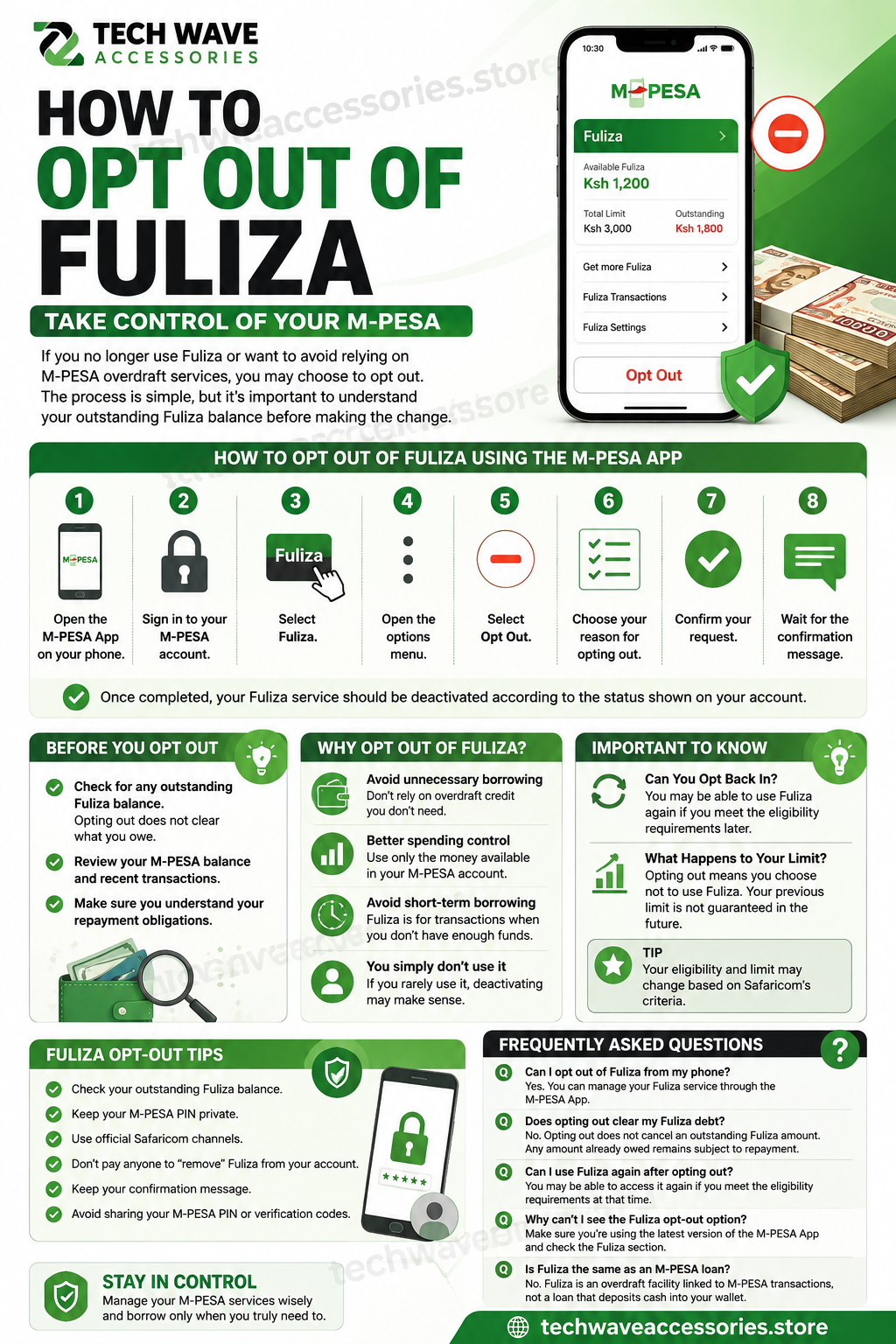
If you no longer use Fuliza or want to avoid relying on M-PESA overdraft services, you may choose to opt out. The process is simple, but it's important to understand your outstanding Fuliza balance before making the change.
How to Opt Out of Fuliza Using the M-PESA App
You can manage your Fuliza service directly through the M-PESA App.
Step-by-Step
- Open the M-PESA App on your phone.
- Sign in to your M-PESA account.
- Select Fuliza.
- Open the options menu.
- Select Opt Out.
- Choose your reason for opting out.
- Confirm your request.
- Wait for the confirmation message.
Once completed, your Fuliza service should be deactivated according to the status shown on your account.
What Should You Do Before Opting Out?
Before opting out of Fuliza, check whether you have an outstanding Fuliza balance.
Remember that opting out does not mean an existing amount you owe disappears. Any outstanding Fuliza obligation still needs to be handled according to the applicable repayment terms.
It's also a good idea to check your M-PESA balance and recent transactions before making changes to your account.
Why Would You Want to Opt Out of Fuliza?
There are several reasons why an M-PESA user may decide to stop using Fuliza.
Avoid unnecessary borrowing: If you don't need overdraft credit, opting out can help you avoid depending on it.
Better spending control: Using only the money available in your M-PESA account can make it easier to manage everyday expenses.
Avoid short-term borrowing: Fuliza is designed for situations where you need to complete an M-PESA transaction despite having insufficient funds.
You simply don't use it: If you rarely use Fuliza, you may prefer to deactivate the service.
Can You Opt Back Into Fuliza?
Your ability to use Fuliza again depends on your eligibility and the options available on your Safaricom account at that time.
If you opt out today, don't assume that your previous Fuliza limit will automatically be available if you decide to return later.
What Happens to Your Fuliza Limit?
Opting out means you are choosing not to use the Fuliza service. Your previous borrowing limit should not be treated as guaranteed access to credit in the future.
If you later become eligible for Fuliza again, the available limit may be different.
Fuliza Opt-Out Tips
Before and after opting out:
- Check your outstanding Fuliza balance.
- Keep your M-PESA PIN private.
- Use official Safaricom channels.
- Don't pay anyone to "remove" Fuliza from your account.
- Keep your confirmation message.
- Avoid sharing your M-PESA PIN or verification codes.
Frequently Asked Questions
Can I opt out of Fuliza from my phone?
Yes. You can manage your Fuliza service through the available M-PESA channels, including the M-PESA App.
Does opting out clear my Fuliza debt?
No. Opting out does not cancel an outstanding Fuliza amount. Any amount already owed remains subject to the applicable repayment terms.
Can I use Fuliza again after opting out?
You may be able to access the service again if you meet the eligibility requirements at that time. Your previous limit isn't guaranteed.
Why can't I see the Fuliza opt-out option?
Make sure you're using the latest version of the M-PESA App and check the Fuliza section. Menu options can change as Safaricom updates its services.
Is Fuliza the same as an M-PESA loan?
Fuliza is an overdraft facility linked to M-PESA transactions, rather than a traditional loan that simply deposits cash into your wallet.
Leave a comment
Share your thoughts with the community.
Amazing Deals For You
Dont Miss Out On the Latest Trending Deals


GUARANTEED PRODUCT QUALITY
No fake products with money back guarantee
Instant returns on unsatisfactory products upon delivery
FAST RELIABLE DELIVERIES
Same day delivery promise within Nairobi,
Mombasa, Nakuru, Kisumu
Selected pickup points for convenience
PERSONALIZED FOR YOU
Pay with debit card, M-PESA or credit card
Compare products for easy purchase
Get digital assistance in your purchase